
Dowel & Bolt Design Software for AS1720.1
Launch the free Timber Dowel & Bolt Calculator below & verify your design in seconds!
Advanced Dowel & Bolt Designs
For decades, Australian engineers have relied on static look-up tables for basic bolt capacity. But modern mass timber projects—from portal frames to complex truss nodes—require more. They require an understanding of combined actions and non-linear group behavior.
The SPEC Toolbox Dowel & Bolt Module is a massive leap forward for the Australian market. It replaces manual spreadsheet calculations with a rigorous AS 1720.1 analysis engine. Whether you are designing with Seasoned Radiata (JD4) or Green Spotted Gum (J1), this tool helps you understand the “true behavior” of your connection under complex loading.
What This Calculator Does
This module utilizes a dynamic visual engine to optimize dowels, bolts, and steel plates in real-time. It moves beyond simple “per bolt” capacity to a full system analysis:

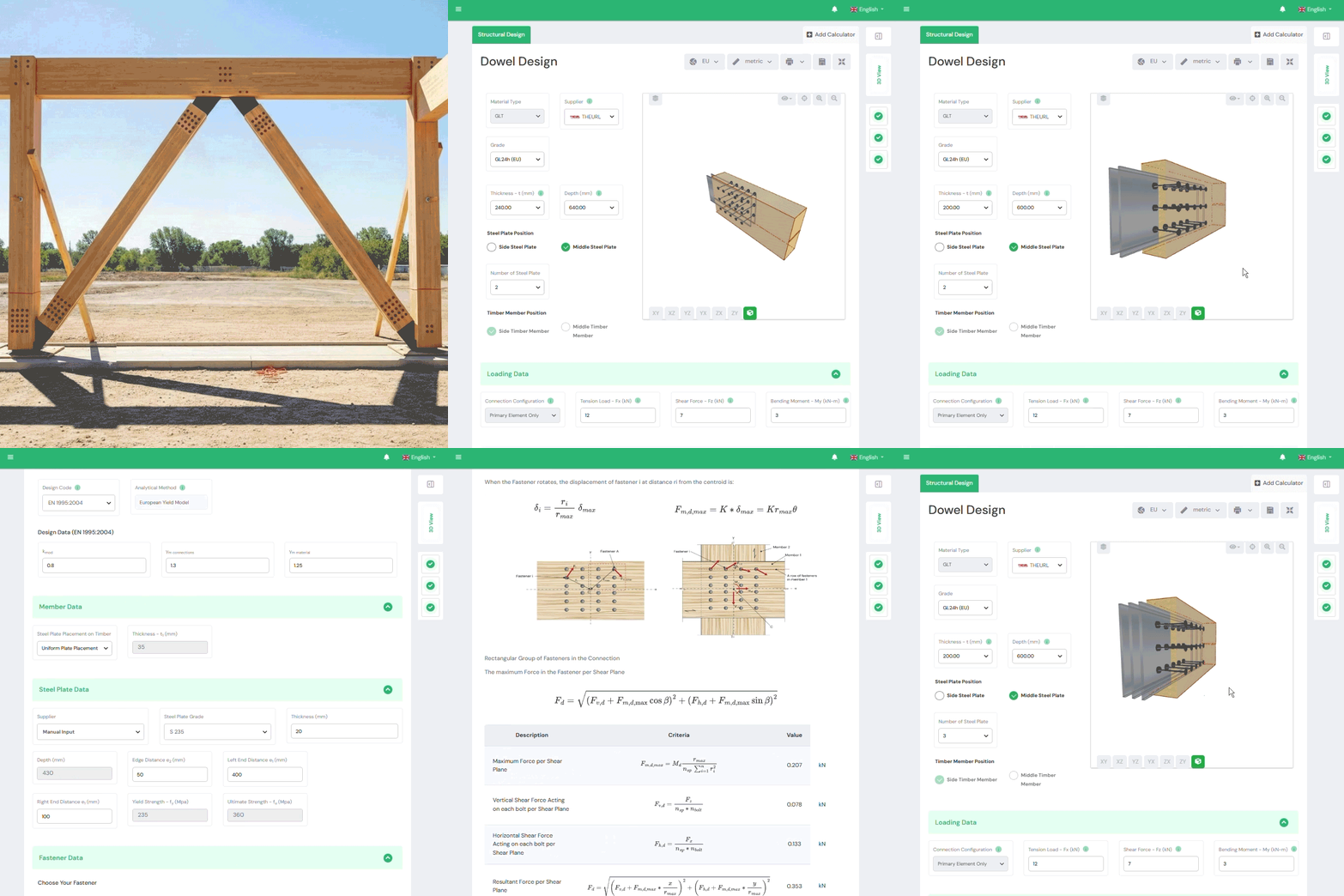
About Dowel & Bolt Connection Design
Technical Guide: Designing to AS 1720.1
1. Joint Groups (J vs. JD)
In Australia, density drives capacity. The tool allows you to select from the full library of Australian species, automatically mapping them to their correct Joint Group:
- Seasoned (JD): e.g., JD4 (Radiata Pine), JD1 (Ironbark).
- Unseasoned (J): e.g., J2 (Green Blackbutt).
- Feature: You can mix species (e.g., a JD1 hardwood column connected to a JD4 softwood beam), and the tool will govern by the weaker member’s bearing capacity.
2. Combined Actions (Moment + Shear)
AS 1720.1 provides values for single bolts, but little guidance on moment connections.
Our module uses a Rational Analysis method. It resolves the applied Moment, Shear, and Axial loads into resultant force vectors on every individual bolt. It then checks each bolt against its specific angular capacity (Nd,θ), ensuring no single fastener is overloaded.
3. The k17 Group Effect
When you line up 10 bolts in a row, the first and last bolts do most of the work.
The calculator applies the k17 Modification Factor (Clause 4.4.2.3) based on the number of fasteners (n) and spacing. This is critical for high-load tension splices where ignoring k17 can lead to unsafe brittle failure.
Key Formulas & Parameters
Design Capacity (Nd):
Nd = Φ · k1 · k16 · k17 · n · Qsk
The tool automates the “k-factor” salad:
- Φ (Capacity Factor): Defaults to 0.80 for Category 1 joints (or 0.85 for Category 2/3).
- k1 (Duration): Checks Short Term (Wind) vs. Long Term (Dead Load).
- k16 : 1.2 for bolts that transfer loads through steel side plates, 1 otherwise
- k17 : factor for multiple bolted joint
- n : number of fasteners
- Qsk : characteristic capacity of bolt according to AS1720.1 clauses C4.1 and C4.2
Frequently Asked Questions
Can I use Green Timber?
Yes. Selecting “Unseasoned” species (Joint Groups J1–J6) automatically adjusts the capacity and applies relevant modification factors for shrinkage and moisture.
Is this compliant with AS 1720.1:2010?
Yes, it is fully compliant with the current standard and includes provisions relevant to the upcoming revisions regarding brittle failure modes (block shear).






 CLT
CLT Dowels
 GLT
GLT Viti
Viti Staffe
 Light-frame