
Timber Bracket Design Software for Eurocode 5
Verify proprietary angle brackets, hold-downs, and shear plates to Eurocode 5 and Supplier ETAs. Access a unified library of Rothoblaas, Pitzl, Eurotec, and Sihga products.
A Unified Library for Proprietary Connectors
In modern timber engineering, standard bolts often aren’t enough. Engineers rely on high-performance proprietary connectors—Hold-Downs for uplift, Angle Brackets for shear, and specialized plates for tension. However, navigating dozens of different European Technical Assessments (ETAs) and manufacturer catalogs is time-consuming and prone to error.
The SPEC Toolbox Brackets Module centralizes this data into one powerful verification engine. Whether you are anchoring a CLT wall or connecting a glulam column, this tool allows you to select, compare, and verify products from leading European suppliers like Rothoblaas, Pitzl, Eurotec, and Sihga in a single interface.
Designing Brackets On SPEC Toolbox
This tool combines the rigour of EN 1995-1-1 with the specific performance data of supplier ETAs. It includes:

Våra partneruppdateringar
Den snabbast växande plattformen för trävaruspecifikationer
Key Timber Brackets Design Capabilities
Overview of Structural Bracket Connections
Steel brackets are widely used in timber construction to transfer forces between structural members such as beams, columns, and supporting elements. These connectors provide reliable load transfer while simplifying installation and improving structural robustness.
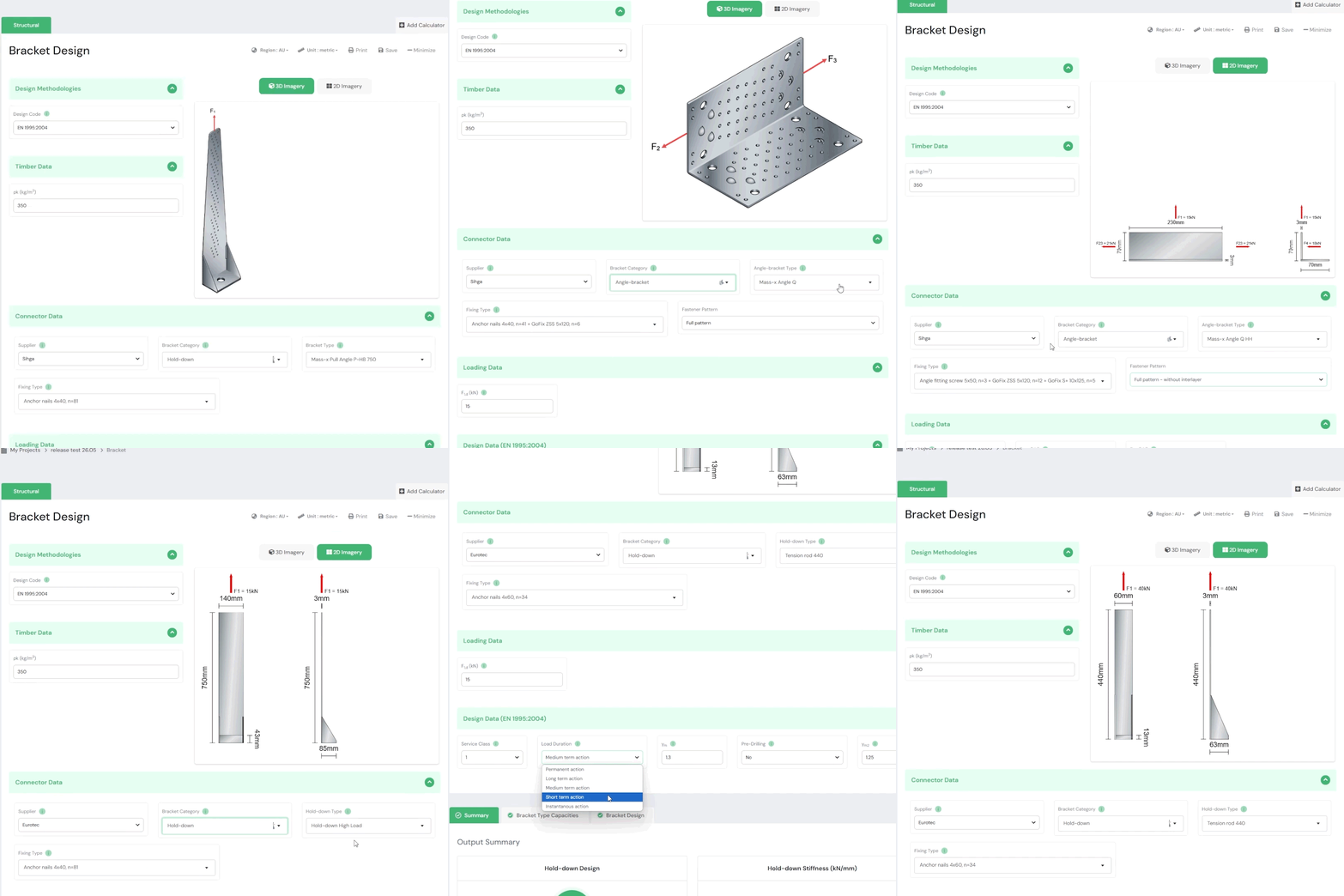
SPEC Toolbox includes a dedicated Bracket Design module that allows engineers to evaluate the performance of timber connections using manufacturer-defined steel brackets. The calculator integrates real bracket geometries and fastening patterns from leading connector manufacturers.
The tool supports brackets from suppliers such as:
-
Pitzl
-
Eurotec
-
Rothoblaas
-
Sihga
-
Simpson Strong-Tie
Each connector is evaluated using supplier-defined geometry, hole layouts, and recommended fastener patterns, ensuring realistic connection modelling.
For the European region, the calculator supports the following design standard:
• EN 1995-1-1:2004 (Eurocode 5)
This standard defines the design rules for timber connections, including fastener resistance, spacing requirements, and timber failure verification.
Interactive 2D and 3D Connector Views
To support intuitive connection configuration, the calculator provides interactive visualizations of the selected bracket geometry.
Users can switch between:
• 3D Imagery – realistic representation of the selected bracket
• 2D View – simplified representation showing dimensions and load directions
• 3D Model View – interactive model that can be rotated and inspected
These visualizations allow engineers to clearly understand the connector geometry, bracket orientation, and load transfer direction before performing structural verification.
Supplier and Bracket Selection
The calculator integrates manufacturer-specific connector libraries, allowing engineers to select brackets directly from recognized suppliers.
Users can define:
-
Connector supplier
-
Bracket category
-
Bracket type
The following bracket categories are currently supported:
-
Angle brackets
-
Shear plates
-
Tension straps
-
Hold-down connectors
Each bracket type includes predefined geometry and hole layouts according to manufacturer specifications. This ensures that the connection design reflects actual hardware used in construction.
Supplier-Defined Fastener Patterns
Bracket connectors typically include predefined hole patterns that determine the number and location of fasteners.
The calculator automatically applies supplier-defined fastener patterns, ensuring that the connection configuration matches the manufacturer’s tested design.
These patterns include:
-
Fastener diameter and type
-
Number of fasteners
-
Fastener spacing
-
Fastener positioning relative to the bracket geometry
By using predefined patterns, the calculator simplifies the design process while maintaining consistency with manufacturer recommendations.
Timber Member Properties
The timber member forms the supporting structural element for the bracket connection. Its material properties directly influence the resistance of the fasteners and the overall connection capacity.
Engineers can define the relevant timber property required for connection verification:
-
Characteristic timber density (ρk)
This value is used to determine the embedment strength of the timber and the resistance of fasteners installed in the member.
Applied Forces on the Bracket
Bracket connections may be subjected to different load components depending on the connector type, orientation, and structural application.
The calculator allows engineers to apply all force components that the selected connector is designed to transfer. Depending on the bracket type and manufacturer-defined configuration, these may include combinations of:
-
Tension forces
-
Shear forces
-
Lateral forces
-
Uplift forces
-
Multi-directional load components
The available load inputs automatically adapt to the selected bracket configuration, ensuring that engineers can define realistic loading conditions consistent with the connector’s intended structural use.
The applied forces are visualized in the connector model to clearly indicate their direction and point of application.
Eurocode-Based Connection Verification
Bracket connections are evaluated according to the provisions of Eurocode 5 (EN 1995-1-1).
The design procedure considers:
-
Timber embedment strength
-
Fastener resistance in timber
-
Load direction relative to the grain
-
Service class conditions
-
Load duration factors
-
Material safety factors
The calculator allows engineers to define key design parameters such as:
-
Service class
-
Load duration
-
Material safety factors
-
Pre-drilling conditions
These parameters influence the resistance of the timber-fastener system and therefore the overall connection capacity.
Timber-Side Connection Capacity
After defining the connector type, timber properties, fastener layout, and applied loads, the calculator performs a structural verification of the connection.
The verification focuses on the timber side of the connection, evaluating the interaction between the timber member and the installed fasteners.
The output summary provides the following checks:
Hold-down Design
The hold-down capacity of the connector is evaluated based on the fastener resistance and timber embedment strength. This check verifies that the connection can safely transfer uplift or tension forces from the bracket into the timber member.
Combined Force Check
Bracket connections are often subjected to multiple simultaneous forces. The calculator evaluates the interaction between these loads to verify that the combined loading condition does not exceed the capacity of the timber-fastener system.
Hold-down Stiffness
The module also provides the connection stiffness, expressed as the hold-down stiffness value. This parameter represents the deformation behavior of the connector under load and can be used in structural modelling or global structural analysis.
Frequently Asked Questions
Can I compare different suppliers?
Yes. You can switch between a Rothoblaas WHT and a similar competitor product to compare capacity and installation requirements instantly.
Does it check the concrete anchor?
The tool verifies the force transferred to the anchor bolt. For the concrete breakout verification itself, we provide the reaction forces needed to run a separate check in accordance with Eurocode 2 (or manufacturer concrete software).
Are new products added automatically?
Yes. As suppliers update their ETAs or release new ranges (like the WKR Double), our cloud-based library is updated to ensure you are always designing with the latest certified values.






 CLT
CLT Dowels
 Skruvar
 GLT
GLT Fästen
 Light-frame